



Nowadays, constant access to favourite games and entertainment, including gambling, has become a minimum standard, and failure to meet it would seem like a serious step backwards to users. As a relatively new company, BetLabel has a keen understanding of the challenges faced by bookmakers and online casinos: modern customers need to be able to switch easily between their numerous devices, depending on the current situation. Thanks to the login procedure, you can do this without any problems — we will tell you about all the nuances of logging into your personal account.
Betlabel Login: quick and secure access to your account
Welcome to Betlabel
BetLabel has been in existence since 2023, which is relatively recent compared to most of its competitors, but at the same time, the brand has already proven itself, demonstrating its readiness to serve customers honestly and at a high level. By registering with us, visitors can try their luck at sports betting and online casino games, carry out financial transactions in both directions (account replenishment and withdrawal of winnings) and take part in numerous promotions and prize draws. The success of the platform has led to attempts by fraudsters to imitate it, so we urge customers to be vigilant and not to attempt to log in to their BetLabel personal account on third-party resources other than our official website and mobile applications.
How to log in to your Betlabel account
You can only log in to your BetLabel personal account if you are a registered customer. Below we will explain how to register with Betlabel. Having an account means that you can use it on an unlimited number of devices, which is convenient if you have a smartphone, tablet, and PC, or if any of these gadgets need to be replaced with a newer model. One account is also sufficient to use all the interface options of our platform: you can log in to the desktop and mobile websites, as well as our mobile applications.

Login via website
To log in to BetLabel via the website, enter betlbl.com in the address bar and click the Login button on the page that loads. The most popular login method is using a username and password, but you can also use your phone number or email address as your username, depending on the information you provided us with during or after registration. You can also use your account ID as your username; this is assigned to all accounts at the time of registration.
Even if you forget your account password, it won't be a problem - in the same authorisation window, click on the Forgot your password link. You will then be asked to enter the email address or phone number linked to your account, and instructions on how to set a new password for your BetLabel account will be sent to you.

Log in via the mobile app
The authorisation principle in the BetLabel mobile application is essentially the same as logging in via the website: you launch the programme, then click the Login button and enter your username and password, as described above. However, the presence of biometric sensors allows you to slightly improve the procedure: in the authorisation window, tick the box next to the word Remember - this will allow you to log in automatically on this device when you launch the application. To ensure security, protect access to the programme with your fingerprint or Face ID — this feature is available on both Android and iOS.
All your actions performed in different interface versions will be instantly synchronised — that is, you can continue to play the bonus you just activated in the application while sitting at your PC.
Alternative ways to log in
Above, we described the method of logging in to the BetLabel website or mobile app using a username and password, but there is also an alternative in the form of authorisation via social networks. This method is only available to those who registered with our establishment in the same way, as well as to users who have linked their account on one of the social networks to their account on our platform. The social networks and messengers that can be used at the moment are as follows:
- Google,
- X,
- Line,
- MetaMask,
- Apple ID.
With this method of authorisation, you may need to log in separately to the social network account you use to authorise on BetLabel. You enter your login and password directly in the social network interface — we do not have access to this data, but simply receive a personal identifier that allows us to recognise the user.
Registering a new account
If you do not yet have an account on BetLabel, you will not be able to log in until you register. Registration is a one-time process, after which you can use your newly created account to log in to your personal account on all your devices, both via the website and in mobile applications. At the time of registration, the customer must be of legal age, not be on any lists of people who have requested self-exclusion anywhere, and not work for other bookmakers or online casinos. If you meet the requirements, the further instructions are as follows:

visit betlbl.com or launch the application downloaded in advance from the same resource;

click the Register button;

select any of the available registration options: by email, phone number, social media, or messenger.

decide on your welcome bonus option by choosing a sports betting reward, a welcome sports freebet or our casino welcome package.

fill in all fields of the registration form;

please read the Terms and Conditions and Privacy Policy of the establishment - completing the registration process is equivalent to your agreement with the provisions of these documents;

click the Register button.
An account created with an email address linked to it must be activated separately. To do this, check your inbox and when you see an email from BetLabel, simply click on the link in it.
Restoring access to your account
As a rule, registered users do not encounter any problems accessing their BetLabel accounts, but our administration has, of course, provided effective solutions in case of unforeseen situations. Here is what to do if the usual authorisation procedure does not work for various reasons.
Forgot your password
Anyone can forget their password, but that doesn’t mean you’ll lose access to your account. If you don’t remember your login password, follow these instructions:
- On the website or in the mobile app, click Sign In.
- Instead of entering your username and password, tap the clickable link Forgot your password?
- Next, select one of the contact details of your choice – either the email address or phone number linked to the account you are restoring.
- Click Send;
- Wait until you receive a letter or text message with further instructions on how to set a new password. The old password, which you have forgotten, is no longer valid from this point onwards.
- Set a new password and log in with it.
If the user registered via social networks or messengers, they may not have a separate password for their BetLabel account — you may have forgotten only the password for the social network itself, but it must be recovered through its own administration.
Problems with login or blocking
In some cases, users cannot log in to BetLabel for no apparent reason — they enter what appears to be correct information, but the system returns an error. There are many possible reasons for this — let’s briefly review the main ones.

Incorrect login details. The simplest explanation is a typo, including the possible use of a capital letter instead of a lowercase letter or vice versa. Check the login and password you entered and make sure there are no mistakes. It may also be that you have changed a previously forgotten password, but are automatically entering the old combination.
Technical work. This happens extremely rarely, but a failure on the servers, including intermediate ones, is possible - because of this, login may be temporarily impossible. There is no other solution here but to wait.
Account suspension. This may be caused by a violation of the user agreement, prolonged disregard of a verification request, or even the customer's own desire, having previously requested self-exclusion. If you do not understand the nature of the problem, please contact our support service: you can write to the chat or email without authorisation.
Betlabel login security
The BetLabel administration takes measures to improve the security of user accounts. For example, we use end-to-end encryption. However, account theft is more often caused by the user’s own carelessness, so here are a few recommendations to minimise the risk of a negative scenario:
- Protect your account with a strong password consisting of at least 8 characters (upper and lower case letters, numbers), and remember to change it at least once a year;
- Do not save your account password on someone else’s or a shared device, and do not use the Remember function on it;
- Do not leave your gadget with your BetLabel account open on an unlocked device — be sure to use the Log Out function to end your session;
- Do not share your login details with other people, including your loved ones;
- Avoid using public Wi-Fi networks — passwords are often stolen through them;
- Use two-factor authentication via Google Authenticator — you can enable it in the settings.
- Do not access our website via links from third-party resources — it is better to type betlbl.com manually in the address bar.
Following these simple steps will make account theft virtually impossible.
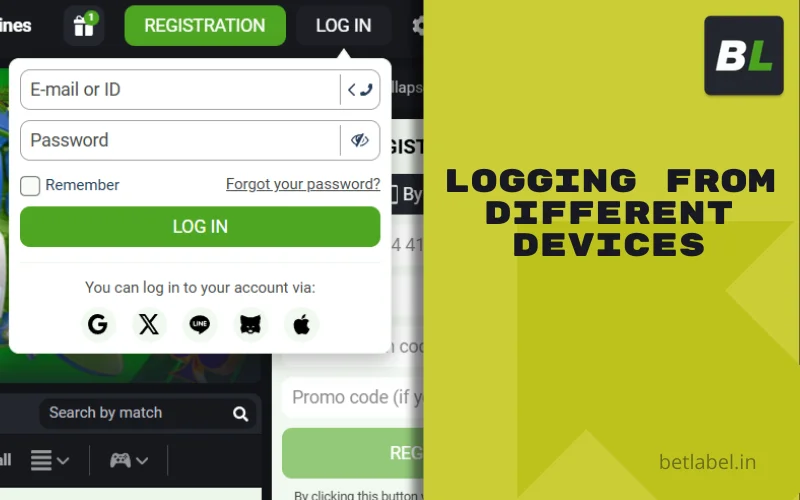
Logging into your account from different devices
The principle of authorisation in your BetLabel account is the same, regardless of whether you use a smartphone, tablet, laptop or PC, or access the site via a browser or mobile app. Using a shared account means that any actions you perform on one device are immediately reflected on all gadgets you use to access the platform. As a precaution, you can view your login history in your account, which will show the IP address, approximate location of the login, and the model of the device used for authorisation. This tool allows you to identify “unfamiliar” logins and understand that you have probably been hacked. In this case, you should forcefully log out of your account on all other devices (this option is available in the corresponding section) and then immediately change your password.
What to do if access is blocked in your country
Users in some countries will not be able to log in or even fully load the BetLabel interface — they will see a message stating that access from their country is blocked. This means that the local regulator does not welcome our establishment operating in its territory: either it requires a local licence, which we do not have, or it prohibits online gambling a priori.
This problem can be solved, but let’s start with what the consequences might be for you. In most civilised countries, users who bypass the block are not punished in any way — problems are only possible when legalising a large win, if you manage to get it (you need to come up with a legal explanation for the origin of the money). However, in some countries with strict legislation, there may be consequences for the player — if this is the case, it is probably not worth the risk.
If you have checked the legislation and are sure that you will not be punished in any way, then you can use a VPN — this is a universal method that allows you to connect through a third country where there are no blocks. With its help, you can launch both the website in your browser and the mobile application. If you only need the website, you can check with customer support for the address of the current mirror — this is a copy of the establishment at an alternative address, managed by the same administration, with all personal accounts, balances, bonuses and betting history preserved.
Betlabel user support
There are three main ways to contact BetLabel customer support:

online chat - available on the website and in mobile applications, you can contact it without authorisation, and you will receive a response within a few minutes.
email, for example, [email protected], allows you to send not only a text message but also screenshots of the problem, and you will receive a reply by email within a few hours.
feedback form - similar to an email, but you send your message directly from the Contacts section of our website or app.
You can contact customer support 24 hours a day, 7 days a week, in the language you prefer. When contacting us, especially if you are writing in the chat as an unauthorised visitor or trying to contact us via email that is not linked to your account, be sure to include your account ID. If your request involves restoring access to your personal account, be prepared for possible re-verification so that we can be sure that it is not fraudsters trying to hack into your account.